Keyboard
The IBM 5150 and 5160 originally used an 83-key IBM “Model F” keyboard1, IBM Part #1501100 (Part #1501105 in the UK2).
Later revisions of the BIOS ROM for the IBM 5160 contained support for the 101-key Enhanced Keyboard3. This keyboard introduced multi-byte scancodes, which required large changes in the keyboard handling code of the BIOS to accommodate.
IBM changed the keyboard protocol with the IBM 5170 AT, making everyone buy new keyboards. Therefore, keyboards of this era are often described as speaking either the “XT” or “AT” protocol. Some keyboards were made that could switch between both, and adapters were (and are) available.
The 83-key keyboard layout is missing many of the keys that we take for granted on modern keyboard layouts. Unlike modern keyboards, the function keys are arranged in a block on the left side.
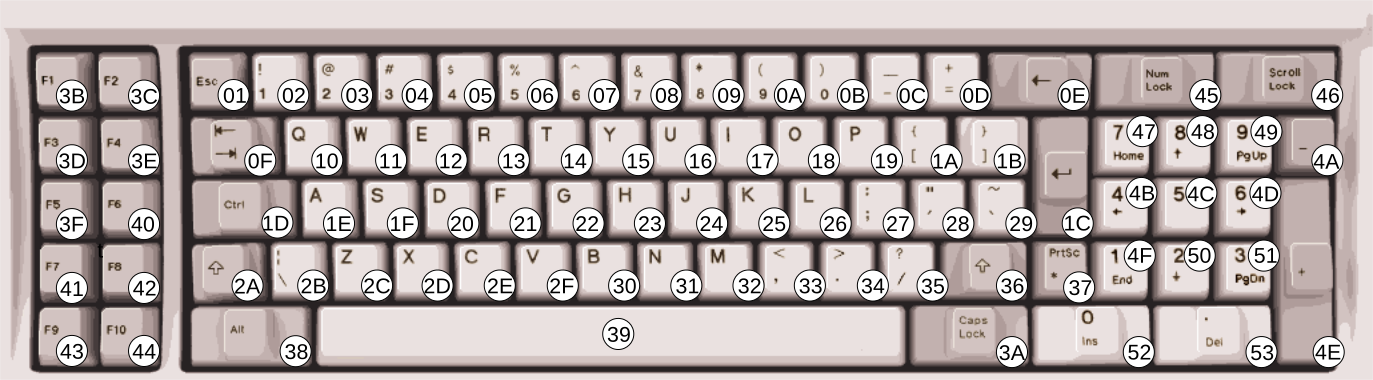
Figure 1.1: IBM PC 83-key Model F Keyboard Layout with scancodes (Click to zoom)
Keyboard Operation
The keyboard communicates with the PC by sending scancodes when a key is pressed or released. On the original 83-key keyboard, each key produces a pair of single-byte scancodes, one when pressed, called the make scancode, and one when released called the break scancode. The make scancodes are typically the values provided in scancode tables, and can be seen in the figure above. Break scancodes are calculated by taking the make scancode and setting the MSB to 1.
Since keyboard operation is event-driven, if the host computer were ever to miss processing a ‘key-up’ scancode, this would cause the phenomenon of a “stuck key,” something most PC users have experienced at one point.
Inside the Model F keyboard is an Intel 8048 microcontroller that is responsible for scanning the internal capacitive key matrix and converting key-presses (and releases) into scancodes to send to the host PC. On early versions of the Model F, the 8048 could be reset directly through the RESET pin on the keyboard DIN connector. Later versions of the Model F disconnected this RESET line and the 8048 is no longer externally resettable, except perhaps by unplugging the keyboard.
The 8048 has burned-in program ROM and a small amount of onboard RAM, in which it keeps a 16-byte scancode FIFO buffer. Scancodes are placed into this buffer as they are detected from the keyboard matrix, and read out as they are sent to the host.
Note
It is important that you buffer scancodes in your emulator - a fast typist can generate scancodes very rapidly - consider how quickly scancodes may be produced in the event that multiple keys are pressed and released at once. It is generally insufficient to deliver one scancode per frame.
The keyboard is a serial device, and the keyboard port is a specialized serial port. The exact electrical details of the keyboard port are not crucially important to emulating the keyboard, except for the operation of the clock pin.
The clock pin is normally pulled up by the motherboard. Both the computer and the keyboard can pull the clock line low - the motherboard has a special driver for this, whereas the keyboard relies on an open-drain output pin.
Setting bit 6 of the 8255 PPI’s Port B register to 0 will result in the motherboard pulling the keyboard clock line low. The keyboard can detect this condition. When held in this state for approximately 20ms, the 8048 will perform a keyboard self-test. When the clock line is released by writing 1 to PPI Port B bit 6, the keyboard will send the special scancode 0xAA about 6-8ms later. If the keyboard internally detects a physically stuck key, it will send the scancode of that key 10ms after sending 0xAA.4.

Figure 1.2: Keyboard reset byte 0xAA timing trace (Click to zoom)
If you fail to emulate sending the reset scancode 0xAA at the appropriate time, the BIOS will emit a POST error code 301.
It is important to note that the ‘clock’ line does not actually clock the 8048 MCU itself. The keyboard data and clock lines are simply connected to specialized I/O pins on the 8048 that allow it to monitor the voltage level of each line, or pull the line to ground.
The 8048 is operationally clocked via an internal oscillator, the speed of which is set in via an LC resonant circuit that configures it for approximately 5MHz. The 8048 is not quite that fast in actual operation due to an internal clock divisor of 15.
Typematic Repeat
Most computer users are familiar with what typically happens when a key on the keyboard is held down: after a short delay, the keyboard will begin repeating the keypress automatically.
IBM called this feature typematic repeat on the Model F. When a key is held down, it will start to repeat after approximately 500ms at a rate of approximately 11 characters per second. Both the make and break scancodes are sent for each repeat.
It is possible to simply pass through the host’s typematic repeat to your emulator, but I recommend handling it yourself, as it gives you better control over the rate (which might otherwise be too fast).
There are some subtleties to typematic repeat operation:
- If more than one key is held down, only the last key will repeat.
- Repeat will stop when a key is released, even if other keys remain held down.
The IBM BIOS keyboard routines will filter typematic events for Ctrl, Shift, Alt, Num Lock, Scroll Lock, Caps Lock, and Insert. If the default BIOS keyboard routines are used by an application that does not process keyboard events fast enough, it is likely that holding down a key will fill the BIOS keyboard buffer and result in several angry beeps from the PC speaker.
The Keyboard Interface
Serial data from the keyboard is first read into a shift register on the motherboard, then ultimately read out in a parallel fashion via the 8255 PPI’s Port A. See the chapter on the IBM PC/XT Keyboard Interface for more details.
SDL Scancode Table
If you happen to be using SDL for your emulator, here’s a table of SDL keycode definitions to IBM scancodes:
| SDL Key | Scancode (hex) |
|---|---|
| SDLK_A | 1E |
| SDLK_B | 30 |
| SDLK_C | 2E |
| SDLK_D | 20 |
| SDLK_E | 12 |
| SDLK_F | 21 |
| SDLK_G | 22 |
| SDLK_H | 23 |
| SDLK_I | 17 |
| SDLK_J | 24 |
| SDLK_K | 25 |
| SDLK_L | 26 |
| SDLK_M | 32 |
| SDLK_N | 31 |
| SDLK_O | 18 |
| SDLK_P | 19 |
| SDLK_Q | 10 |
| SDLK_R | 13 |
| SDLK_S | 1F |
| SDLK_T | 14 |
| SDLK_U | 16 |
| SDLK_V | 2F |
| SDLK_W | 11 |
| SDLK_X | 2D |
| SDLK_Y | 15 |
| SDLK_Z | 2C |
| SDLK_1 | 02 |
| SDLK_2 | 03 |
| SDLK_3 | 04 |
| SDLK_4 | 05 |
| SDLK_5 | 06 |
| SDLK_6 | 07 |
| SDLK_7 | 08 |
| SDLK_8 | 09 |
| SDLK_9 | 0A |
| SDLK_0 | 0B |
| SDLK_RETURN | 1C |
| SDLK_ESCAPE | 01 |
| SDLK_BACKSPACE | 0E |
| SDLK_TAB | 0F |
| SDLK_SPACE | 39 |
| SDLK_MINUS | 0C |
| SDLK_EQUALS | 0D |
| SDLK_LEFTBRACKET | 1A |
| SDLK_RIGHTBRACKET | 1B |
| SDLK_BACKSLASH | 2B |
| SDLK_SEMICOLON | 27 |
| SDLK_APOSTROPHE | 28 |
| SDLK_COMMA | 33 |
| SDLK_PERIOD | 34 |
| SDLK_SLASH | 35 |
| SDLK_GRAVE | 29 |
| SDLK_LSHIFT | 2A |
| SDLK_RSHIFT | 36 |
| SDLK_LCTRL | 1D |
| SDLK_RCTRL | 1D |
| SDLK_LALT | 38 |
| SDLK_RALT | 38 |
| SDLK_CAPSLOCK | 3A |
| SDLK_F1 | 3B |
| SDLK_F2 | 3C |
| SDLK_F3 | 3D |
| SDLK_F4 | 3E |
| SDLK_F5 | 3F |
| SDLK_F6 | 40 |
| SDLK_F7 | 41 |
| SDLK_F8 | 42 |
| SDLK_F9 | 43 |
| SDLK_F10 | 44 |
| SDLK_F11 | 57 |
| SDLK_F12 | 58 |
| SDLK_UP | 48 |
| SDLK_DOWN | 50 |
| SDLK_LEFT | 4B |
| SDLK_RIGHT | 4D |
| SDLK_INSERT | 52 |
| SDLK_DELETE | 53 |
| SDLK_HOME | 47 |
| SDLK_END | 4F |
| SDLK_PAGEUP | 49 |
| SDLK_PAGEDOWN | 51 |
| SDLK_KP_1 | 4F |
| SDLK_KP_2 | 50 |
| SDLK_KP_3 | 51 |
| SDLK_KP_4 | 4B |
| SDLK_KP_5 | 4C |
| SDLK_KP_6 | 4D |
| SDLK_KP_7 | 47 |
| SDLK_KP_8 | 48 |
| SDLK_KP_9 | 49 |
| SDLK_KP_0 | 52 |
| SDLK_KP_PLUS | 4E |
| SDLK_KP_MINUS | 4A |
| SDLK_KP_PERIOD | 53 |
| SDLK_KP_ENTER | 1C |
| SDLK_KP_DIVIDE | 35 |
| SDLK_KP_MULTIPLY | 37 |
| SDLK_KP_EQUALS | 0D |
Primary References
Citations
-
wikipedia.org Model F keyboard. ↩
-
seasip.info The IBM 1501105 Keyboard ↩
-
minuszerodegrees.net IBM 5160 - Keyboards ↩
-
minuszerodegrees.net 5160 Keyboard Startup ↩
